We value your privacy

We use cookies to analyse site traffic and improve your experience. You can accept all cookies or reject non-essential ones. See our Privacy Policy for details.

GR IT SERVICES
  • Contact
Get a quote
  1. Security & Compliance
  2. Microsoft Defender
Microsoft Defender

Microsoft Defender, deployed and tuned by certified engineers.

Get a Defender quoteSee capabilities
Microsoft
Microsoft
Defender
Cloud Solution Partner
  • 80+Defender tenants
  • 5minP1 Incident SLA
  • 24/7SOC monitoring
  • Endpoint+ID+CloudFull suite
What "tuned Defender" looks like

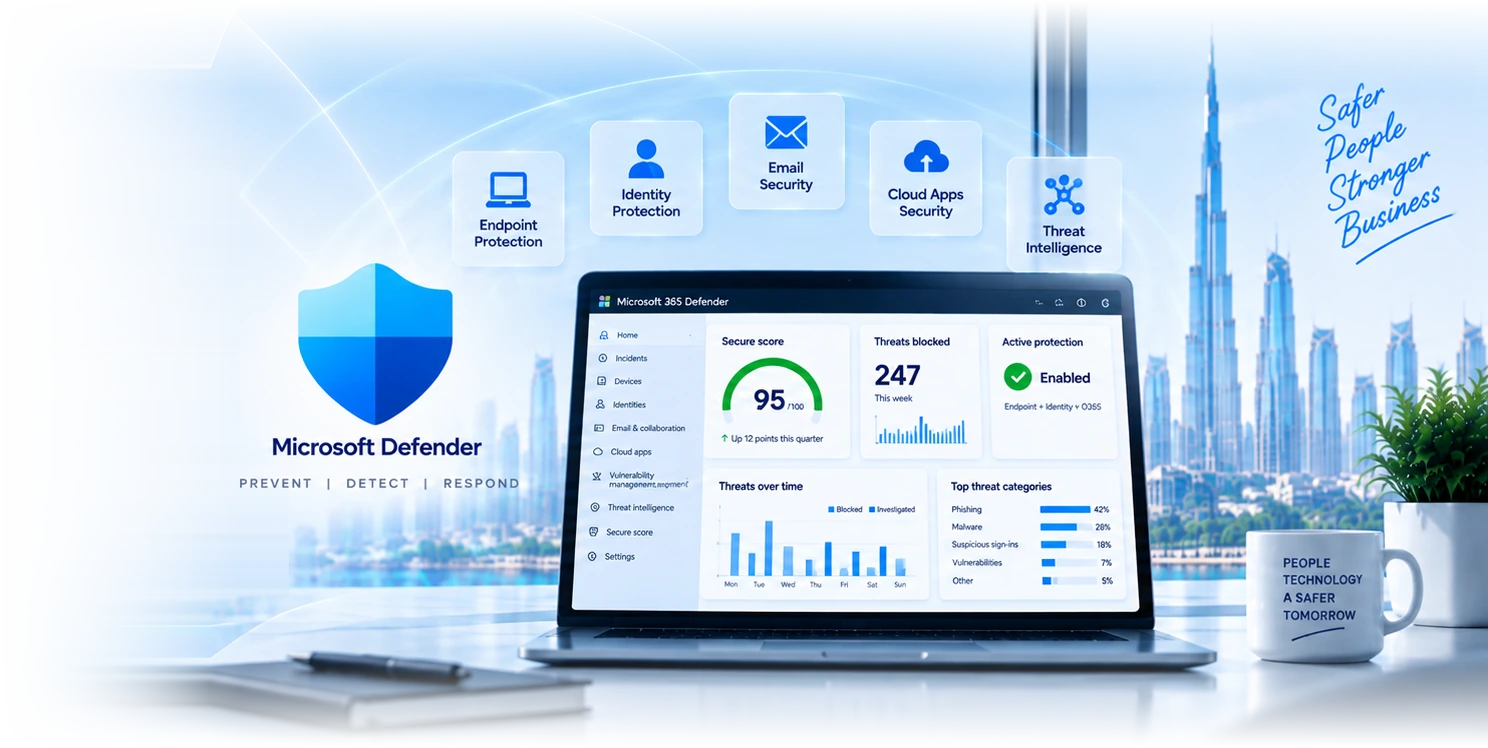
A real Defender tenant after baseline tuning.

Pulled from a managed-SOC client portal. Score, blocked threats, and active protection state, the operational view security leads ask for in board meetings.
Preview
Microsoft Secure Score
95
/ 100
Up 12 points this quarter
Active Protection
Enabled
Endpoint + Identity + O365
Threats Today
0
247 blocked this week
Coverage By Pillar
  • Endpoint EDR100%
  • Identity (Entra + AD)100%
  • Email & collab100%
  • Cloud apps (CASB)92%
Recent SOC Pulse
  • All systems operational
    2 min ago
  • Phishing campaign blocked, 14 mailboxes
    12 min ago
  • Vulnerability scan completed
    1 hr ago
  • Suspicious sign-in flagged for review
    4 hr ago
False-Positive Rate
< 2%
Down from 38% pre-tuning

Indicative dashboard. Real client tenants vary by licence and threat profile, the engagement model below applies to all of them.

Microsoft Defender
What Defender does

Eight layers, one threat-protection platform.

Defender is multiple products in one suite: endpoint, identity, email, cloud apps, vulnerability management, threat intelligence. We deploy what your licence covers and tune it for your environment, not the marketing demo.

Defender for Endpoint

EDR with behavioural analytics, automated investigation, attack-surface reduction. Tuned for your endpoint estate, with custom indicators and policies.

Defender for Identity

On-prem AD and Entra ID threat detection. Lateral-movement detection, golden-ticket alerts, privilege-escalation visibility, integrated with the SIEM.

Defender for Office 365

Email anti-phishing, attachment sandboxing, link rewriting, impersonation protection. Tuned to your email patterns; false-positives reduced through baselining.

Defender for Cloud Apps

CASB across SaaS apps. Shadow-IT discovery, session controls, anomaly detection, conditional access integration with Entra ID.

Defender Vulnerability Management

Continuous vulnerability scanning across endpoints, prioritised by CVSS plus exploit context, integrated with patch management for closed-loop remediation.

Microsoft 365 Defender portal

Unified incident view across the suite. Threat-hunting queries, automated investigation playbooks, integrated with our SOC for 24/7 coverage.

Defender for Family / Individuals

Microsoft's consumer-grade Defender for personal devices and family accounts. Identity-theft monitoring, credit alerts, and cross-device protection for staff who BYOD.

Defender for Threat Intelligence

Microsoft Threat Intelligence feed and IOCs surfaced into your SOC. Adversary tracking, TTP mapping, and curated indicators integrated with Sentinel for proactive hunting.

Implementation process

How we deploy Defender, week by week.

Every Defender engagement runs the same 4-phase project plan. Each phase has a defined output and a sign-off gate before we move on.
  1. 01
    Phase 1· 1-2 weeks

    Assessment & Planning

    Posture assessment, infrastructure inventory, compliance review, threat-model workshop. Output: written gap report, deployment plan, and licence map.

    • Security posture assessment report
    • Infrastructure and identity inventory
    • Compliance requirements review
    • Deployment roadmap with sign-off gate
  2. 02
    Phase 2· 2-3 weeks

    Configuration & Setup

    Defender suite rollout: Endpoint, Identity, Office 365, Cloud Apps. Policies configured to baseline, custom indicators deployed, integrations stood up.

    • Defender suite deployed across estate
    • Baseline policies and conditional access
    • SIEM integration (Sentinel / Splunk / QRadar)
    • Custom detection rules and hunt queries
  3. 03
    Phase 3· 1-2 weeks

    Testing & Optimisation

    Simulated attacks, penetration testing, false-positive triage. Every alert is tuned. We do not hand over a noisy SOC.

    • Simulated phishing and ransomware exercises
    • Performance and signal-to-noise tuning
    • False-positive suppression rules
    • Alert volume baseline and SLO
  4. 04
    Phase 4· 1 week

    Training & Handover

    Your team learns the portal, the playbooks, and the escalation paths. Documentation handed over. Managed-SOC contract starts the same day if applicable.

    • Admin and IR team training sessions
    • Runbook and playbook documentation
    • Incident response plan with escalation matrix
    • Ongoing managed-SOC handover
Why GR IT for Defender

Four reasons clients pick us for the deployment.

Defender deployments are easy to start and hard to operate well. Here is what makes ours different.

80+ Defender tenants

Pattern recognition matters. We have tuned Defender across SMEs, regulated firms, and multi-tenant deployments. Common false-positives, common configuration traps.

Tuned, not just enabled

We baseline your environment, tune detections, suppress false positives, and document what we changed. Out-of-the-box Defender is a starting point, not a destination.

Dubai-based SOC

24/7 SOC operations from Dubai. P1 incidents get a senior engineer on the case in 5 minutes. Same team that deployed Defender operates it.

Audit-ready evidence

ISO 27001, NESA, DFSA reviews answered with Defender telemetry, configuration history, and incident response logs. Compliance-ready by default.

Industries using Defender

Defender deployments by sector.

Six sectors where Defender provides material security uplift over native M365 protection.

Financial services

DIFC and ADGM-licensed firms using Defender to satisfy regulator-required threat protection. Audit-ready logs, regulator-coordinated incident response.

Healthcare

Clinics, hospitals, and medical groups using Defender for PHI protection, ransomware containment, and DHA-compliant incident reporting.

Professional services

Law firms, accountancies, consultancies. Confidentiality-aware email protection, document-level DLP, ethical-wall enforcement via Defender for Cloud Apps.

Tech and SaaS

SaaS companies and software vendors using Defender as part of SOC 2 readiness. Endpoint EDR, identity threat protection, vulnerability management.

Retail and e-commerce

Retail groups using Defender to protect POS endpoints, e-commerce admin accounts, and PCI-relevant systems against ransomware and account takeover.

Education

Schools and universities using Defender to protect student devices, faculty accounts, and exam systems against phishing and ransomware.

Cloud security with Defender

Cloud-side controls beyond endpoint.

Three Defender capabilities most organisations forget they own. We turn them on and tune them as part of every Professional or Enterprise engagement.

Cloud Security Posture Management

Defender CSPM gives full visibility into your Azure, AWS, and GCP posture. Contextual insights, prioritised by exploit context, with built-in remediation workflows.

  • Multi-cloud posture, Azure / AWS / GCP
  • Critical-risk prioritisation with exploit context
  • Built-in remediation workflows
  • Compliance mapping (ISO, NESA, PCI)

Defender for DevOps

Pipeline security across GitHub, Azure DevOps, GitLab. Code scanning, secret detection, IaC review, container image scanning. Shift-left security without blocking developers.

  • Code, secrets, and IaC scanning in pipelines
  • Container image vulnerability scanning
  • GitHub / Azure DevOps / GitLab integration
  • Per-repo posture scoring

External Attack Surface Management

Continuous discovery of internet-facing assets you forgot you had. Subdomains, leaked credentials, exposed APIs. Findings prioritised by exploitability.

  • Continuous external asset discovery
  • Exposure scoring and remediation guidance
  • Domain, IP, and certificate monitoring
  • Threat-actor TTP mapping
Defender vs native M365 protection

What Defender adds over Exchange Online Protection.

Native M365 protection (EOP, basic conditional access) is fine for low-risk tenants. Defender becomes essential when threat actors target your specific industry or your customer data is the asset. The honest comparison:
Email anti-phishing
Native M365Basic
Defender suiteBehavioural and impersonation protection
Endpoint EDR
Native M365
Defender suite
Identity threat detection
Native M365
Defender suiteAD + Entra ID telemetry
Vulnerability management
Native M365
Defender suite
Cloud-app DLP and CASB
Native M365
Defender suite
Automated investigation
Native M365
Defender suite
Audit-ready incident logs
Native M365Limited
Defender suiteFull evidence chain
Feature
Native M365
Exchange Online Protection
Defender suite
EDR + identity + cloud
Email anti-phishing
BasicBehavioural and impersonation protection
Endpoint EDR
Identity threat detection
AD + Entra ID telemetry
Vulnerability management
Cloud-app DLP and CASB
Automated investigation
Audit-ready incident logs
LimitedFull evidence chain
Endpoint security and management

Defender across every endpoint surface.

The Defender for Endpoint family covers what most organisations need under one console: workstations, servers, IoT, mobile, and the vulnerability-management workflow that ties them together.

Microsoft 365 Defender

Unified XDR across Microsoft 365 endpoints, identity, email, and apps. Cross-signal correlation surfaces multi-stage attacks a single product would miss.

  • Cross-signal incident correlation
  • Automated investigation and response
  • Threat-hunting with KQL
  • Unified portal for SOC teams

Defender for Endpoint

Industry-leading EDR with behavioural analytics, attack-surface reduction, and proactive threat hunting. Tuned per-environment, not out-of-the-box defaults.

  • EDR with behavioural detection
  • Attack-surface reduction rules
  • Custom indicators and policies
  • Live-response shell for incident handlers

Defender for IoT

Operational technology and IoT-device monitoring. Real-time visibility, asset discovery, and OT-specific threat detection for manufacturing, utilities, and healthcare.

  • Passive OT asset discovery
  • Network anomaly detection
  • CVE matching for OT devices
  • Integration with M365 Defender

Defender Vulnerability Management

Continuous vulnerability assessment across endpoints and servers, prioritised by CVSS plus exploit-in-the-wild context, integrated with patch workflow.

  • Continuous CVE discovery
  • Exploit-context prioritisation
  • Integration with Intune / SCCM
  • Remediation tracking and SLA
Eight reasons Defender pays back

The business case in eight cards.

When Defender is deployed and tuned properly, these are the operational outcomes our managed-Defender clients see in the first year. Aggregated across 80+ tenants, not cherry-picked.

Seamless deployment

Cloud-delivered policies push from a single console. No agent rebuild on every endpoint, no on-site rollout truck. Most deployments complete inside 2-6 weeks.

Centralised management

M365 Defender portal unifies endpoint, identity, email, and cloud-app security into one console. One incident view, one threat-hunting surface, one set of policies.

Real-time protection

Behavioural detection, attack-surface reduction, and automatic remediation block threats at execution time, not on next-day signature update.

Behaviour-based detection

EDR analytics surface zero-day and fileless attacks signature-based AV cannot see. Tuned per environment so legitimate admin tools do not generate noise.

Threat intelligence integration

Microsoft Threat Intelligence feed, third-party IOCs, and your custom indicators all consumed into the same detection surface. Adversary tracking baked in.

Cloud-powered protection

Detection logic runs in the cloud at Microsoft scale. Endpoints stay light, telemetry feeds back to the SOC for correlation across the estate.

Compatibility and scalability

Windows, macOS, Linux, iOS, and Android all in scope. Single-tenant or multi-tenant. From 50-endpoint SMEs to 5,000-endpoint enterprises, same platform.

Compliance and reporting

ISO 27001, NESA, DFSA, PCI evidence packaged from Defender telemetry. Audit-ready by default; control-mapping documentation produced for every engagement.

Reform your business with Defender

Defender done right is an operating posture, not a product purchase.

Most organisations buy Defender, deploy it with default policies, and never look at it again. The result is a noisy SOC, alert fatigue, and a false sense of security. The point of a managed Defender deployment is to make Defender disappear into the background while still catching real threats.

  • Reduce alert volume by 80%+ through baseline tuning
  • Pair Endpoint + Identity + Email for full XDR coverage
  • Operationalise threat-hunting queries, not just alerts
  • Keep audit-ready evidence ISO / NESA / DFSA reviewers accept
  • Hand off operations to a Dubai-based 24/7 SOC, not a ticket queue
  • Re-tune quarterly as the threat landscape shifts
Book a Defender review
How a deployment runs

From discovery to managed SOC operations.

Every Defender engagement runs the same path. Documented, evidenced, deliverable on a fixed timeline.
  1. 1

    Discovery

    1-2 weeks

    Tenant audit, current-state assessment, licence review, threat-model workshop. Output: gap report and deployment plan.

  2. 2

    Deployment

    2-6 weeks

    Endpoint rollout, policy configuration, baseline tuning, false-positive suppression. Custom detections and queries deployed.

  3. 3

    Validation

    1 week

    Penetration test against the deployment, simulated phishing, simulated ransomware. Findings closed before SOC handover.

  4. 4

    Managed SOC

    Continuous

    24/7 monitoring, incident response, monthly threat reports, quarterly tuning reviews. Same team that deployed runs the SOC.

“We deployed Defender out of the box and got 4,000 alerts a week, mostly noise. GR IT spent two weeks tuning detections and suppressing false positives, and our alert volume dropped to 30 a week with the same coverage. The team that finally caught a real phishing campaign was the same team that did the tuning. Match.”
Hassan Al Suwaidi
Head of Information Security · Mid-market financial services group
Alert volume from 4,000/wk to 30/wk, true-positive rate up
Experience Defender

See Defender across five core security workloads.

Pick a workload to see what Defender protects, the controls we configure, and the operational outcome you should expect after baseline tuning.

Endpoint EDR with behavioural detection

Defender for Endpoint sits on every workstation and server, blocking malware before execution and capturing forensic telemetry for investigations. Tuned with your golden-image baseline so legitimate admin tools do not generate noise.

  • Behavioural EDR with attack-surface reduction
  • Custom indicators and live-response shell
  • Managed via Intune or SCCM, single agent
  • P1 incidents triaged within 5 minutes by SOC
Outcome
99.7%
mean malware-block rate after tuning
Common questions

Microsoft Defender, frequently asked.

Depends on your licence and threat profile. Most clients start with Defender for Endpoint and Defender for Office 365, then add Defender for Identity if they have on-prem AD, and Defender for Cloud Apps if they use significant SaaS beyond M365. We map your licence and risk in the discovery and recommend, in writing.

Starter: 2-3 weeks. Professional: 4-6 weeks. Enterprise: 6-12 weeks. The variable is policy testing and false-positive suppression; we will tell you up front whether your timeline is realistic.

Yes, included in Professional and Enterprise tiers. 24/7 monitoring, P1 5-min response SLA, monthly threat reporting, quarterly tuning. Starter tier deployments can add managed-SOC as an annual subscription.

Yes. Defender XDR can forward alerts to most SIEMs (Sentinel native, Splunk, QRadar, Elastic). We design the integration during scoping, including alert deduplication and signal-to-noise tuning.

Defender XDR has automated-investigation built in for common scenarios. We extend with custom playbooks via Logic Apps or Sentinel SOAR for organisations that want hands-off response on routine incidents.

Two layers: in-line suppression rules during deployment baseline, and ongoing monthly tuning reviews where we triage recent alerts and adjust detections. Most clients see false-positive volumes drop 80%+ after the first quarter.

Yes. We assess current state, identify gaps and tuning issues, and deliver a remediation plan. Most takeovers complete in 2-4 weeks with minimal disruption to ongoing operations.

Defender provides evidence for ISO 27001 A.12 (operations), A.13 (communications), A.16 (incident management), NESA T1-T5 controls, DFSA SYSC requirements. We package the evidence for your auditors and produce control-mapping documentation.

It is confusing, and the confusion causes real purchasing mistakes, so here is the plain mapping. Defender for Endpoint protects devices and is the EDR component. Defender for Office 365 protects mail and collaboration against phishing and malicious attachments. Defender for Identity watches on-premises Active Directory for attack patterns such as lateral movement. Defender for Cloud Apps is the CASB, governing SaaS usage and data movement. Defender for Cloud is a different product entirely, covering Azure and multi-cloud posture and workload protection. Defender XDR is the unified portal that correlates signal across the first four. Separately, Microsoft Defender Antivirus is the antivirus built into Windows, which is included with the operating system and is not the same thing as Defender for Endpoint. Most UAE mid-market organisations need Endpoint and Office 365 first, Identity if they still run on-premises AD, and the others as the estate justifies.

For the overwhelming majority of organisations, yes, and holding on to a legacy product alongside it usually makes things worse rather than better. Defender for Endpoint performs at the top of independent testing, and the decisive advantage is integration: it shares signal with Entra, Office 365 and Sentinel, so a compromised endpoint can automatically trigger identity-level containment in a way a standalone product cannot. The genuine trap is running two endpoint protection products simultaneously, which happens more than it should. They interfere, performance suffers, and you frequently end up with Defender in passive mode doing nothing while the other product is the only real protection. If you are migrating, decommission the old one properly rather than leaving it installed as a comfort blanket.

Plan 1 gives you the protection: next-generation antivirus, attack surface reduction rules, device control and basic response actions such as isolating a machine. Plan 2 adds the investigation and hunting capability: endpoint detection and response with a full timeline of what happened, automated investigation and remediation, advanced hunting across your data with queries, threat and vulnerability management, and sandbox analysis. The practical way to decide is to ask who will use the Plan 2 features. If nobody is going to run hunting queries or review automated investigations, you are buying capability that will sit idle, and Plan 1 with a managed SOC on top may serve you better. If you have a security team, or you are buying our SOC service, Plan 2 is where the value is because we use those features on your behalf. Plan 2 is included in E5 and Business Premium includes Plan 1.

By accepting that a raw alert feed is not a security programme and building the triage layer deliberately. Out of the box a mid-sized estate generates far more alerts than anyone will review, most of them low severity and a good proportion of them noise from legitimate administrative activity. The work is tuning: suppress the patterns that are genuinely your own tools doing their job, adjust attack surface reduction rules that fire on legitimate line-of-business behaviour, and configure automated investigation so routine cases resolve themselves with a record. After that you need somebody actually looking, on a defined rhythm, with clear criteria for escalation. The failure mode we inherit most often is a well-licensed Defender deployment where the alert queue has four thousand unreviewed items and nobody has opened it since the month it was deployed.

Attack surface reduction rules block the behaviours attacks depend on rather than trying to recognise the specific malware. Blocking Office applications from spawning child processes, blocking script execution from email attachments, blocking credential theft from the Windows credential store, blocking untrusted executables running from USB. These matter because they defeat entire categories of attack regardless of whether the specific payload has ever been seen before, which is precisely where signature-based detection struggles. They are also the most commonly unconfigured part of Defender, because enabling them carelessly breaks legitimate applications. The correct approach is audit mode first, which logs what would have been blocked without blocking it, then reviewing those logs, then enforcing rule by rule. It takes a few weeks and it is the highest-value tuning work in the whole product.

Yes, and coverage is better than most people assume, though it is not identical across platforms. Defender for Endpoint runs on macOS with antivirus, EDR and vulnerability management, on Linux for servers, and on iOS and Android with web protection, phishing protection and jailbreak or root detection. Windows remains the deepest implementation with the fullest set of attack surface reduction and response capabilities, so plan for capability differences rather than assuming parity. In practice for a UAE business with a mixed fleet, this means you can consolidate on one product and one console rather than running separate tooling per platform, which is worth a great deal operationally even where the macOS feature set trails Windows slightly.

That depends entirely on what you have configured, and it is the question worth answering before it happens rather than during. With automated investigation and response enabled, Defender can investigate and remediate routine cases itself: quarantine the file, kill the process, and record what it did, all without waking anyone. For anything beyond routine, an alert is raised, and the honest question is who receives it and what they do. In most organisations we assess, the answer is an email address nobody monitors overnight, which means a detection at 2am becomes an incident discovered at 9am with seven hours of attacker dwell time. That gap is the entire argument for a managed SOC, and it is a coverage problem rather than a product problem. Defender detected it correctly either way.

Yes, and it is how most of our clients consume it. Managed Defender covers deployment and onboarding, policy and baseline tuning, attack surface reduction rollout through audit to enforcement, alert triage with same-day response during business hours and 24/7 for P1, threat and vulnerability management with a prioritised remediation plan rather than a raw list, monthly reporting a non-technical reader can act on, and the evidence pack for audits. The distinction we draw is between monitoring, where somebody watches, and management, where somebody also fixes things and keeps the configuration current. Buying monitoring alone tends to produce a stream of notifications about problems nobody has the remit to resolve.

Four to eight weeks for a typical mid-sized organisation to reach a properly tuned state, and the timeline is set by tuning rather than by onboarding. Devices can be onboarded in days, particularly where they are already Intune-managed. Weeks one to two cover onboarding and getting visibility across the estate, which usually reveals devices nobody knew about. Weeks two to five run attack surface reduction rules in audit mode and review what they would have blocked, tune policies against your actual applications, and configure automated investigation. Weeks four to eight move rules to enforcement in stages, establish the alert triage rhythm, and integrate with Entra conditional access so a non-compliant device loses access. Rushing the audit-mode period is the single most common cause of a rollback.

Onboarding first, because you cannot protect or investigate what is not reporting. Get every device onboarded and confirm the estate is visible, which usually reveals machines nobody knew about. Then turn on the protections that carry no breakage risk, next-generation antivirus and cloud-delivered protection. Then run attack surface reduction rules in audit mode for two to three weeks and read what they would have blocked, because that is where the tuning work is and where enabling carelessly breaks a line-of-business application. Only then move rules to enforcement, in stages. The mistake we most often inherit is a well-intentioned administrator who enabled everything on a Friday and spent the following week turning it back off.
Further reading

Resources for security leads.

Microsoft Entra

Identity-first security: SSO, MFA, conditional access, privileged-access management. Often deployed alongside Defender for full identity coverage.

Learn more

Microsoft Sentinel

SIEM and SOAR built on Azure. Pairs with Defender XDR for unified detection, automated response, custom KQL detections at scale.

Learn more

Cybersecurity audit

Independent security audit before or after Defender deployment. Penetration test, framework gap analysis, written remediation programme.

Learn more
Ready to deploy Defender properly?

Talk to a security specialist.

Three-minute form. Our security team gets back the same business day to schedule a discovery call. We will tell you which Defender products fit your licence and risk before you commit to a deployment.

Get a Defender quoteSee cybersecurity audit

Related Services

Explore more solutions that work great with this service

Defender XDR

Eleven signal sources, one incident, and containment without a human

Learn more

Defender for Endpoint

Business, Plan 1 or Plan 2, and what each actually gives you

Learn more

Entra Conditional Access

The control that decides who reaches your data

Learn more

DMARC Audit UAE

Stop exact-domain spoofing, and keep your mail delivering

Learn more

Microsoft 365 Security Audit

Tenant review, and how far back your evidence really goes

Learn more

Jamf Protect UAE

macOS endpoint security, honestly compared with Defender

Learn more

Microsoft Security Dubai

Entra, Defender, Purview, Sentinel, and what you already own

Learn more

Microsoft Entra

Identity and access management solutions

Learn more
GR IT SERVICES

Leading IT services provider in Dubai,
delivering enterprise-grade solutions
for businesses across the UAE.

Microsoft CSP PartnerCISGuard

Get the Helpdesk app

Raise and track IT tickets from your phone.

Download on the App StoreGet it on Google Play
Learn more about the app

Microsoft 365

  • Microsoft 365 Administration
  • M365 Reporting & Auditing
  • Microsoft 365 Licensing
  • Microsoft Copilot
  • Microsoft 365 Apps
  • Windows 365 Cloud PC
  • Microsoft SharePoint
  • Outlook & Exchange

Security

  • Microsoft Defender
  • Microsoft Purview
  • Microsoft Intune
  • Microsoft Entra
  • Compliance Manager
  • Cybersecurity Audits
  • Copilot for Security
  • Microsoft Sentinel
  • Microsoft Priva

Infrastructure

  • Google Workspace
  • Cloud Migration Services
  • Data Analytics & BI
  • Active Directory
  • Server Management
  • Apple Business
  • Apple Jamf Pro
  • IP Telephone
  • Data Backup
  • Website Development

IT Services

  • Managed IT Services
  • IT Support Dubai
  • IT AMC Dubai
  • New Office IT Setup
  • IT Relocation
  • Remote IT Support
  • On-Call IT Support
  • Startup IT Business Kit
  • Disaster Recovery & BC

Company

  • About Us
  • Careers
  • Contact
  • Blog

Contact

  • Iris Bay Tower, Office 903,
    Business Bay, Dubai, UAE
  • +971 56 613 2743
  • hello@gritservices.ae
  • gritservices.ae

© 2026 GR IT Services. All rights reserved.

Privacy PolicyTerms of UseCookie Policy